
Dual R9700 vs. Ryzen AI Max+ 395: Local AI Server Buying Guide
Compare dual Radeon AI PRO R9700 GPUs and Ryzen AI Max+ 395 for local AI: Radiance results, model capacity, response speed, hardware costs and power.
By chris · Published · Updated · 16 min read
Updated October 5, 2026: Added the newer Radiance results and project status, long-context and caching evidence, more context for the 395 benchmarks, and refreshed U.S. price references.
You want AI your team can use at work: answering questions, processing documents, helping with code, or powering an n8n workflow. You also want to know what the computer will cost, where it will sit, and whether it can keep up.
Two options we work with are a compact AMD Ryzen AI Max+ 395 system and a tower with two AMD Radeon AI PRO R9700 GPUs. Both can serve several requests through vLLM, the software we use to run language models for shared applications. Newer R9700 software also includes the separate Radiance inference engine, discussed below.
The 395 is appealing when space, power use and room for larger models matter most. The dual-GPU tower is the option we would explore first when fast responses and busy shared workloads are the priority, with more flexibility for separate services and future upgrades. We help you choose, build and deploy the system around the work you need it to do.
A small box or a full tower?
The size difference is easy to underestimate from a specification sheet. Framework’s 395 desktop is about 9 inches tall and under 4 inches wide. A conventional tower can be more than twice as tall and much deeper.
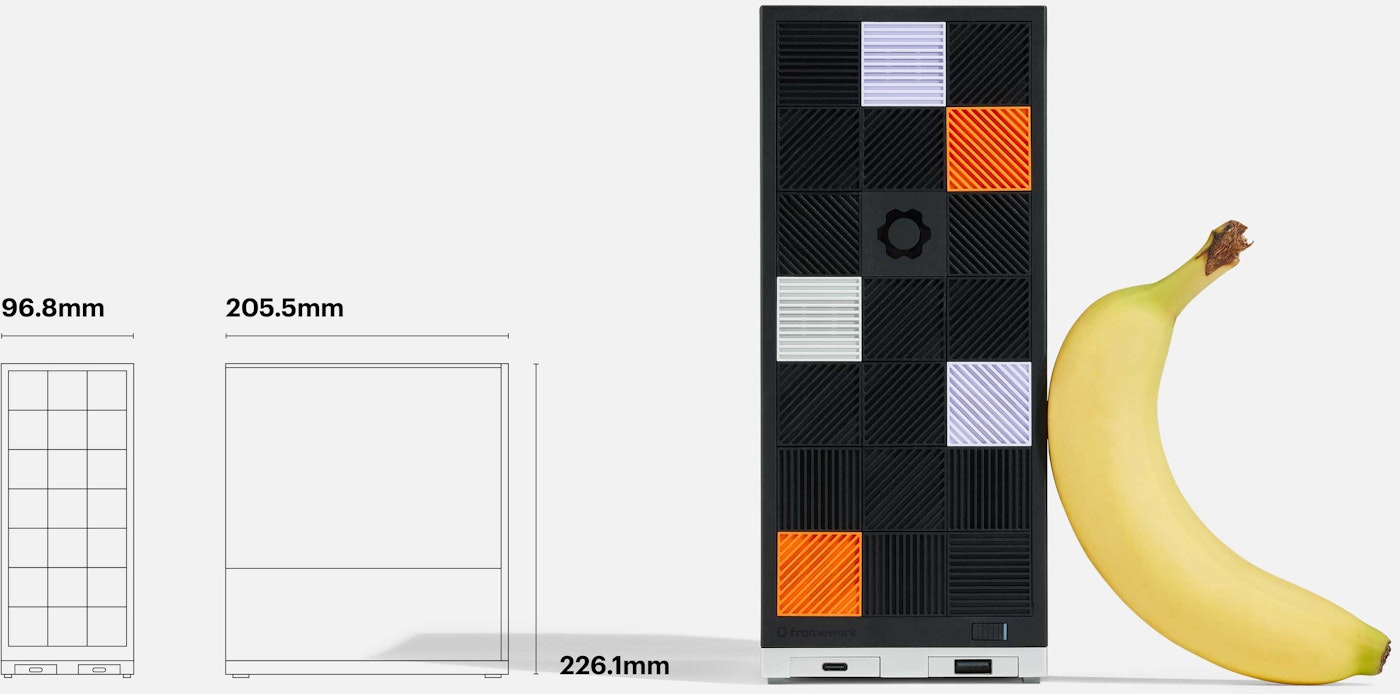
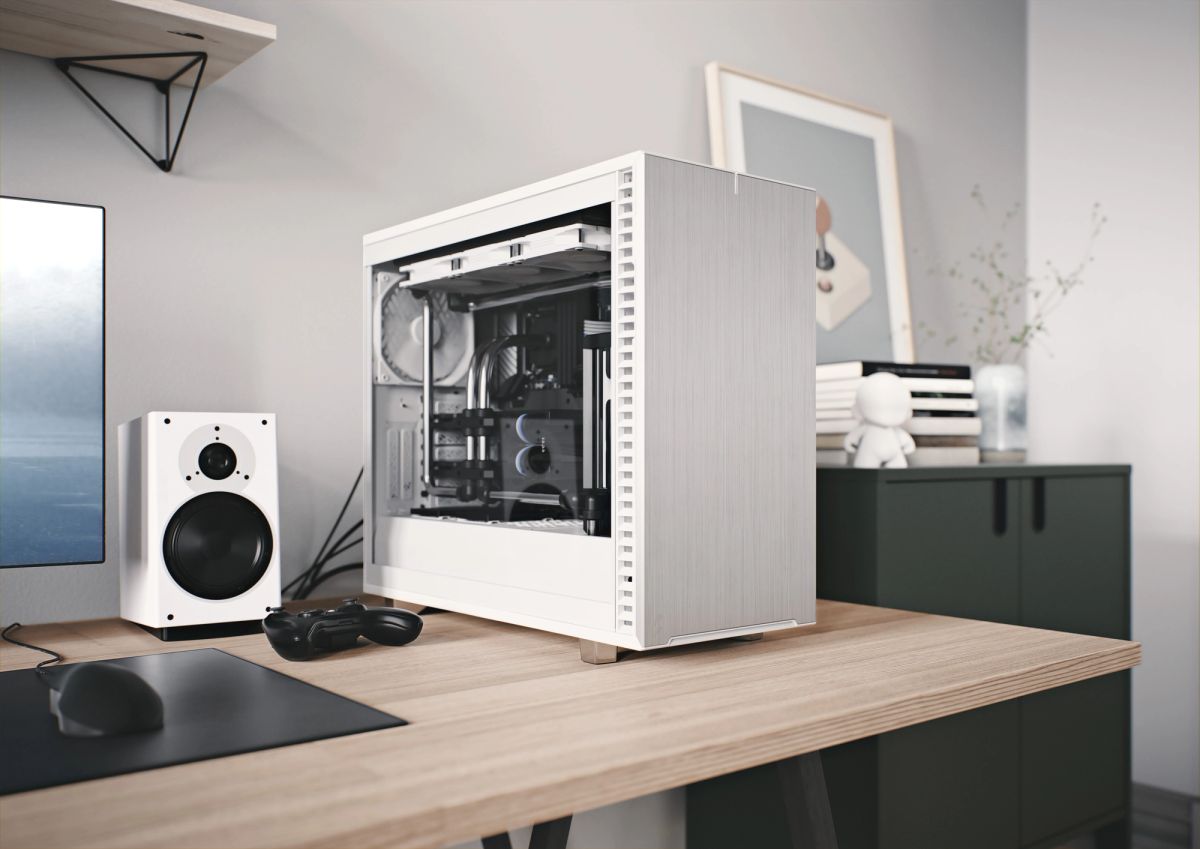
A compact system can live on a desk or shelf. A dual-GPU tower needs more room for airflow, and its heat and fan noise deserve consideration if people will work beside it. We choose the enclosure and cooling as part of the build.
Which one fits your business?
| What matters to you? | Ryzen AI Max+ 395, 128GB | Dual R9700 tower |
|---|---|---|
| Small footprint and lower power use | A strong reason to choose it | Needs more space and cooling |
| Fast interactive responses | Model architecture and serving software matter; test the intended workload | Our starting point for a speed-focused build; validate the chosen model |
| Room for larger models | More shared memory available | 32GB per card; larger models need multi-GPU support or a tested offload configuration |
| Separate AI services | Workloads share the same resources | Can dedicate a card to each service |
| Future hardware upgrades | Storage is usually expandable; memory is fixed | More parts can be replaced or upgraded |
| Several people using AI at once | Yes, within the chosen model’s tested capacity | Yes, within the chosen model’s tested capacity |
Response speed deserves as much attention as model size. If your team is used to cloud coding assistants, waiting for a local answer to slowly appear can be frustrating. We would prioritize a tuned tower for that use case, then check response quality and speed with your actual tasks. Fast token generation alone does not make a local model equivalent to Claude or the models behind Codex.
How large a model can you run?
Think of memory as the room a model needs to work. Larger models usually need more of it, and each active conversation needs some room too. Model compression, called quantization, helps larger models fit, although it can affect answer quality.
With two R9700s: you have 32GB per card, or 64GB combined. Models in the 8B–32B range give you plenty of options. A compressed 70B model can also be a practical target, depending on the software and conversation length. The software has to split larger models across the cards; the memory does not combine automatically. AMD specifications; vLLM multi-GPU guidance.
With a 128GB 395: there is more room for larger compressed models. AMD documents up to 96GB available for graphics on Windows, with other allocations possible on Linux. That opens up many 70B and some 100B–120B-class options. The exact model, architecture and serving-software support still matter. A mixture-of-experts model can have many total parameters while using only a smaller subset for each generated token; fitting a model and generating answers quickly are separate questions. AMD’s memory explanation.
Budget memory for model weights, the conversation cache, serving overhead and any speculative draft model. Longer conversations and more simultaneous requests compete for that space. CPU offload can extend capacity, but brings a different performance tradeoff from keeping the model on the GPUs.
Bigger does not always mean better for your business. A smaller model that handles your documents accurately and responds quickly may be the better purchase. We also leave memory available for simultaneous requests rather than filling the machine with the largest model that will load.
Will it keep up with the team?
Both systems can use vLLM to handle requests together, improving the amount of work completed across the whole team. The important number is how many requests overlap. Twenty employees asking occasional questions create a very different load from twenty automated agents working continuously.
Faster answers are a reason to buy the tower
Tokens are the pieces of text a model generates. More tokens per second generally means less waiting while an answer appears. In AMD’s preliminary Qwen3.8-27B test, a single R9700 reached 51.8 tokens/second versus 24.5 on the 395: about 2.1× faster generation. Both used Windows, llama.cpp and Vulkan, with different MTP settings. That supports the case for dedicated GPU speed, but it is not a dual-GPU vLLM result or a promise of the same advantage under load.
Earlier published deployment examples
Published vLLM tests show what particular configurations can achieve with Qwen3.8-27B. The tower uses FP8 with DFlash2; the 395 uses BF16 with MTP. Different precision, acceleration, prompts and software builds prevent a fair hardware-only speed comparison. These are third-party results, not our own benchmarks. This earlier table remains useful as a deployment example; the newer Radiance evidence below uses a different configuration.
Sources: dual-R9700 test and Ryzen 395 test.
View published results and test differences
| Client requests | Dual R9700, FP8 + DFlash2 | 395, BF16 + MTP |
|---|---|---|
| 1 | 98.5 | 6.58 |
| 2 | 165.0 | 12.23 |
| 4 | 278.2 | 18.87 |
| 8 | 390.4 | 32.86 |
| 16 | 418.5 | 48.70 |
Tower: bkvargyas, August 28, 2026. Two PCIe 5.0 x16 R9700s, tuned P2P, vLLM-radiance 1.0.11 (vLLM 0.28 / ROCm 7.14), tensor parallelism 2, FP8 weights/cache, DFlash2 k=7. BetterBench 0.2.3, 48 requests per level; thinking reported on. Server capped at eight active sequences.
Compact: nabe2030, 128GB GMKtec EVO-X2. vLLM commit c8602c790, BF16 with MTP, ROCm 7.2.2 runtime on Ubuntu 26.04 (not a validated OS/runtime pairing). ShareGPT-derived workload, 200 requests per condition; reasoning off. These are the vLLM results, not the repository’s problematic llama.cpp HIP results.
Neither study is a controlled cross-machine trial. We found no matched dual-R9700/395 Qwen3.8-27B vLLM test with identical precision, prompts, decoding settings and latency targets. Do not divide these results to predict your hardware speedup or divide total throughput by concurrency to claim measured per-user decode speed.
The practical takeaway: a well-tuned tower can deliver responsive shared serving, but configuration matters. In the tower study, median per-request generation stayed around 81 tokens/second at eight requests. Pushing sixteen clients into its eight-slot server increased the 99th-percentile wait for the first token to about 8.3 seconds. That is why we size a system around acceptable waiting time, not a headline user count.
Before recommending a system, we would test the chosen model with your kind of requests at increasing loads. That includes the wait before an answer starts, how quickly it finishes, and what happens during a busy period. n8n jobs can also use queues so a batch of background work does not overwhelm the service.
What changed with Radiance?
Radiance now refers to three projects worth distinguishing. StillDeadcode’s original vLLM-radiance was marked unmaintained on October 4, 2026. Its author moved to standalone Radiance, a C++/HIP engine with an OpenAI-compatible API. magiccodingman’s maintained vLLM-radiance fork continues separately. Results and support claims from one project should not be applied to the others.
The fork’s September 22 candidate report is encouraging. Its vLLM 0.30 / Radiance 1.1.0-rc1 profile uses two R9700s, Qwen3.8-27B Quark MXFP4 weights, FP8 conversation cache, an 8,192-token context limit and eight active sequences. BetterBench 0.2.2, 85% GPU allocation and disabled prefix caching define this test.
| Mode | Weighted decode score | Aggregate at eight requests |
|---|---|---|
| Non-speculative baseline | 53.9 | 304.1 |
| DFlash2 K5, experimental | 172.3 | 610.4 |
| DFlash2 K7, experimental | 186.7 | 510.2 |
These faster modes are experimental. Every speculative mode matched the baseline’s exact output in only one of eight fixed tests. Both DFlash modes passed 30/30 sampled multi-tool tests; MTP failed one. The report recommends non-speculative serving and records no production-image publication or deployment for this candidate. Weighted scores and aggregate throughput describe different measurements.
For a business deployment, this makes the tower more interesting to evaluate, while answer quality, complete tool calls and sustained service behavior still need testing. The candidate does not establish a hardware speedup over the 395 or a controlled improvement over the earlier FP8 tower test.
Long documents and repeated prompts change the picture
A separate August 25 capacity test used the fork’s vLLM 0.28 stack, MXFP4 target, FP8 cache and DFlash2 K5 on two R9700s. Four requests, each with 130,816 input tokens plus 256 output tokens, completed without running out of GPU memory. Two giant cold prompts temporarily waited while the scheduler processed the others. That establishes capacity for this profile, rather than fast first answers at every context length.
In its separate repeated-prefix probe, the wait for the first token fell from 9.036 seconds cold to 0.705 and 0.707 seconds warm, with identical output. Reusing a shared instruction or document prefix can therefore matter for document assistants and repeated agent calls. These tests used a different profile from the September 22 table, and DFlash remained experimental.
The standalone engine also offers a different route to larger models: its roughly 114GiB Flash-Next model file uses expert tiering, keeping frequently used experts in GPU memory and streaming others from host memory. The recipe calls for about 32GB of free host RAM. This is developer-reported offload support, not an entire 114GiB model resident in the cards’ 64GB or a matched comparison with the 395. It warrants a workload trial before a buying recommendation.
The 395 deserves a model and software comparison too
The original 128GB EVO-X2 study includes usable Vulkan results as well as vLLM. With Qwen3.8-27B and MTP, llama.cpp Vulkan Q4_K_M produced 16.65 aggregate output tokens/second at one request, versus 6.58 for vLLM BF16. At eight requests, vLLM led 32.86 to 29.42. Different precision prevents an engine-only comparison, but the slower single-request vLLM figure is clearly not a ceiling for the 395.
A September 13 vendor benchmark from CWWK illustrates model architecture. On its 64GB CW-A9, Qwen3.5-35B-A3B-AWQ reached 18.21 aggregate tokens/second versus 3.28 for dense Qwen3.5-27B-AWQ with one request and a 128-token input. The larger model activates about 3B parameters per token. This used Ubuntu 24.04.1, ROCm 7.2.1, vLLM 0.20 and just 32 output tokens: useful evidence for choosing a model, with a short workload that does not establish sustained interactive speed or predict a 128GB system’s performance.
Our revised guidance: evaluate a suitable compressed mixture-of-experts model and serving engine on the 395, particularly for light interactive use. Evaluate the tuned tower for heavier shared serving. Compare both with the same business tasks, quality checks and acceptable waiting time.
What about images and video?
A dual-GPU tower is worth considering if you want language, image and video workloads on the same machine. For example, one card could run a language model while the other handles image jobs, provided each workload fits. Software support determines whether a single job can use both cards.
The 395’s larger shared memory can help with bigger media models, but generation time still needs testing. For video, resolution and clip length make a substantial difference. We scope the actual workflow before recommending hardware.
The motherboard is part of the AI purchase
Two long GPU slots do not by themselves establish a good dual-R9700 platform. Before quoting a tower, we check the CPU and motherboard’s actual lane allocation, each card’s negotiated PCIe link, whether installing an M.2 SSD changes that allocation, GPU-to-GPU communication, physical slot spacing, power connectors and sustained cooling.
Published R9700 platform notes document poor link negotiation on an older bifurcated system and substantial recovery after a whole-platform migration. They reinforce the need to validate the complete build; the reported gain does not isolate PCIe generation as the cause. A motherboard allowance in a worksheet still needs a compatible, tested parts selection.
What should you budget?
Price review: October 5, 2026, U.S. dollars. The confirmed GMKtec 128GB examples below are $3,499.99–$3,649.99 for the computer. A dual-R9700 build needs a current, itemized quote. The roughly $1,900-per-card reference is a September 6 observation; current GPU price and stock were not reverified. Host-memory capacity, component reuse and availability can change the tower budget considerably.
These are hardware reference prices before tax, shipping, setup and support. We provide a project quote covering the configuration and deployment you actually need.
See price references and provisional component allowances
- GMKtec EVO-X2: 128GB/1TB listed at $3,499.99; 128GB/2TB at $3,649.99, marked available in the U.S. product variants on October 5. The $2,199.99 default page price is for the 64GB/1TB model.
- Corsair AI Workstation 300: the linked 395/128GB/4TB configuration is out of stock. Its earlier $3,399.99 price could not be substantiated as a current offer, so it is excluded from the refreshed price range.
- B&H ASUS R9700 listing: $1,899.99 per card and temporarily out of stock at the September 6 review. This is a historical reference; price and availability could not be reverified on October 5.
Provisional worksheet, not a complete available build or an offer for sale. Several components below are allowances rather than priced, selected parts. Confirm the entire configuration before purchase.
| Component | Budget | Basis |
|---|---|---|
| Two R9700 cards | $3,799.98 | Historical September 6 B&H reference; obtain a current quote |
| Ryzen desktop CPU | $400 | Planning allowance |
| Motherboard with appropriate dual-GPU lanes | $500 | Planning allowance |
| 128GB DDR5 host-memory example, if required | $2,499.99 | Crucial Pro 2×64GB; Newegg marketplace seller Blazing Memory, listed in stock October 5 |
| 2TB NVMe SSD | $250 | Planning allowance |
| Suitable 1200W-class power supply | $250 | Planning allowance; verify connectors and load |
| Case and case fans | $250 | Planning allowance |
| CPU cooling | $100 | Planning allowance |
The GPU row is historical, the Crucial 128GB RAM row is one current marketplace listing, and other rows are planning allowances. The same RAM page also listed Velztorm at $2,099.99, but that offer was out of stock in the retailer’s product data. Neither offer establishes a market average or a required spend.
A GPU-resident workload does not automatically need 128GB of host RAM. We size it for the operating system, model loading and the other services; offload or expert tiering adds its own host-memory requirement. We select capacity and modules against the motherboard compatibility list, then obtain current pricing. The budget excludes assembly, deployment, backups, a UPS and ongoing support.
Power costs add up, especially around the clock
The compact system generally has the advantage on power and heat. For a simple example, assume the tower draws 650 watts and the 395 system draws 160 watts while working. At 18 cents per kWh, continuous operation would cost about $84 versus $21 a month.
Those are calculated examples, not measured power draw from these machines. For eight hours a day over 22 workdays, the active-use cost would be about $21 versus $5, plus any power used while idle.
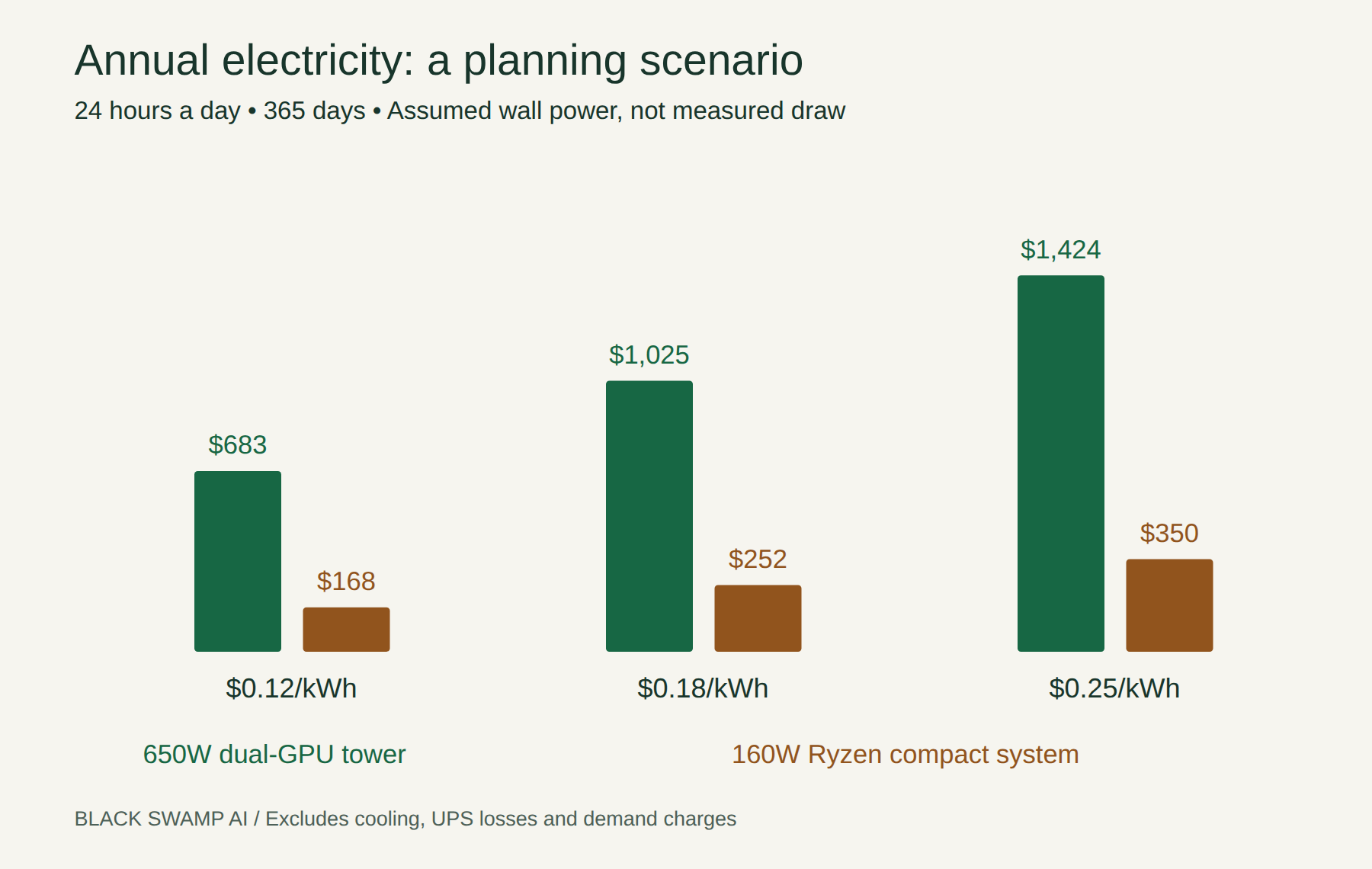
Your workload and electricity rate determine the real bill. A faster machine may finish a batch sooner, so we also consider energy per completed job. Cooling, backup power and where the heat goes matter when the server will run all day.
Maintenance and room to grow
The tower is easier to expand. GPUs, memory and storage can be replaced within the limits of the platform. It also has more fans and components to maintain. Adding a third or fourth GPU may require a different motherboard, enclosure and power supply.
The 395 is simpler physically. Storage is usually expandable, but CPU and memory upgrades generally mean replacing the mainboard or the system. Choosing enough memory at purchase is especially important.
Both need software updates, backups and someone responsible for keeping the service available. We can include deployment, monitoring and ongoing maintenance in the project, with the scope agreed up front. The supported AMD software stack varies between the two platforms.
For budgeting, three to five years is a useful planning window, not an expiry date. A system can keep doing valuable work longer if its models still meet your needs. The tower gives you more ways to extend that life through individual upgrades.
Buy now or wait?
Memory and storage prices have been volatile. Framework has documented repeated cost increases, and TrendForce’s September market update reports continued pressure on PC memory pricing.
Over the next three to six months, further increases, steadier prices and selective discounts are all plausible. There is no dependable date when these systems will become cheaper. Our approach is to price a complete build close to purchase, confirm availability, and compare the cost of waiting with the value of putting it to work.
Let’s choose the right system for your work
Choose a 128GB Ryzen AI Max+ 395 when you want a compact shared AI server with more room for large models and a smaller power bill. Choose a dual-R9700 tower when faster interactive responses, busy shared workloads, separate services and hardware expansion are higher priorities. We validate the chosen configuration against your model and expected load before recommending it.
Our local AI build and deployment service can cover either option, model setup and connections to your applications or n8n workflows. You do not need to arrive with a parts list. Tell us what you want AI to do, how many people or automations will use it, and what you want to spend.
Talk to us about your AI system
Radiance developments, additional benchmark evidence and selected price references reviewed October 5, 2026. Earlier results and historical prices retain their own dates. Model support and availability change; your quote and deployment plan will use the requirements agreed for your project.
Researched and edited with GPT-6 Astra. Reviewed by Chris at Black Swamp AI.
Have a project in mind?
We can help scope a local AI build or automation workflow.
Discuss it with Chris ↗